Chaque employé travaille différemment. Pour certains conducteurs, arriver chez un client signifie que le trajet est terminé. Un représentant commercial peut être en réunion avec un compte, ou un technicien de service peut commencer une visite prévue. Pour d'autres, comme les livreurs ou les marchandiseurs qui effectuent plusieurs arrêts au cours de la journée, un court arrêt n'est qu'une partie d'un itinéraire plus vaste.
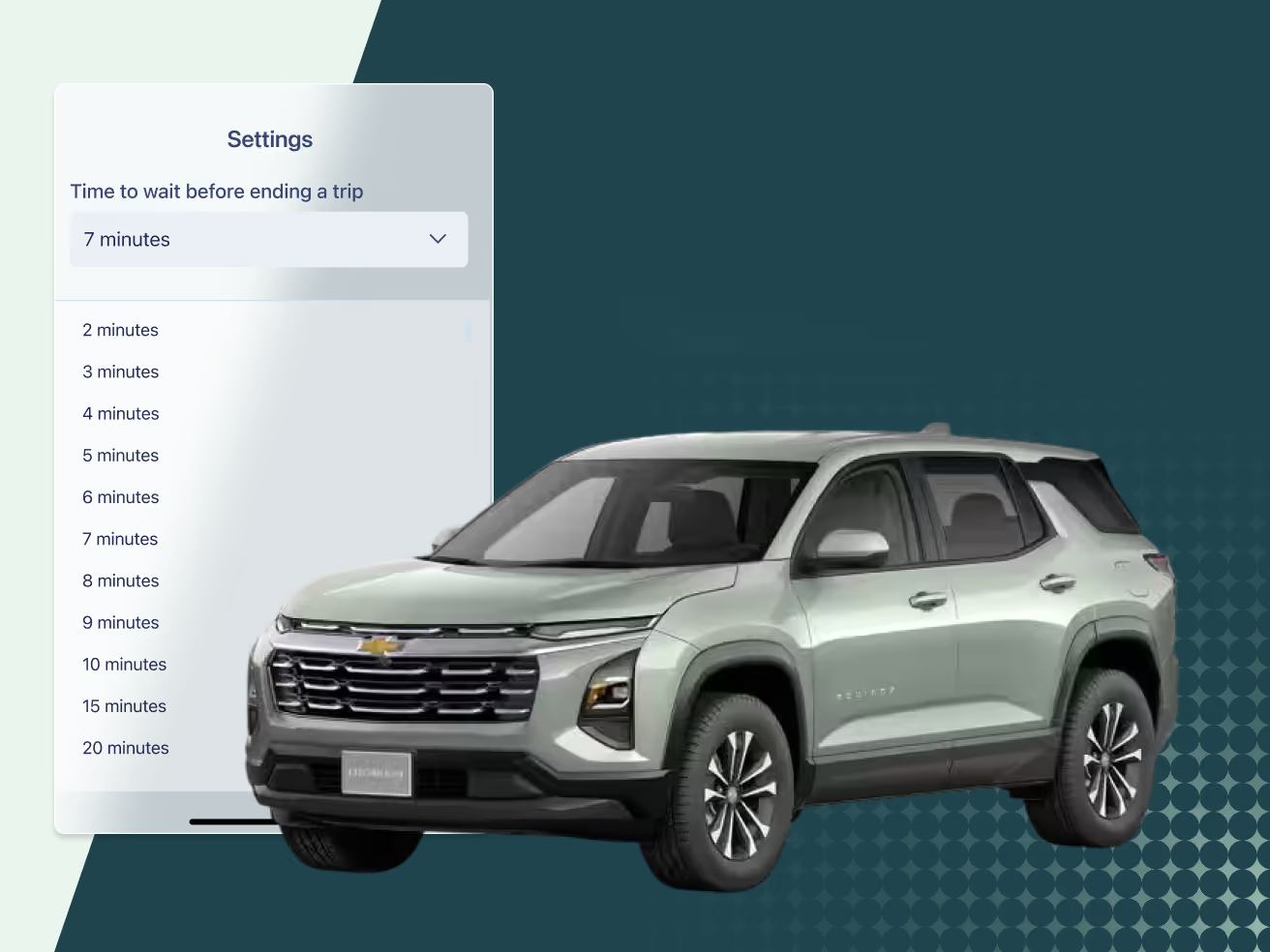
Cardata Mobile offre désormais aux conducteurs plus de flexibilité pour adapter le suivi des trajets à leur façon de travailler. Grâce à un nouveau paramètre de personnalisation de fin de trajet, les conducteurs peuvent choisir la durée d'attente de l'application avant de mettre fin à un trajet lorsqu'ils sont à l'arrêt.
Que vous effectuiez des livraisons, visitiez plusieurs clients ou passiez du temps sur un chantier avant de vous rendre à votre prochain arrêt, vous pouvez personnaliser le suivi de vos trajets pour qu'il reflète mieux vos habitudes de conduite quotidiennes.
Qu'est-ce qui a changé?
Cardata Mobile inclut désormais un paramètre personnalisable de fin de trajet en cas d'immobilisation.
Les conducteurs peuvent choisir combien de temps l'application attend avant de mettre fin à un trajet après l'arrêt du mouvement et lorsqu'ils restent immobiles dans leur véhicule. Au lieu d'utiliser une durée par défaut unique, les conducteurs peuvent sélectionner l'option qui correspond le mieux à leurs habitudes de conduite et à leur flux de travail quotidien.
Ce paramètre est disponible directement dans l'application mobile et peut être ajusté à tout moment.
L'application attendra désormais la période d'inactivité que vous avez sélectionnée avant de mettre fin automatiquement à un trajet. Cela permet d'éviter que les trajets ne soient divisés en plusieurs segments lorsque de courts arrêts font partie d'un itinéraire plus long.
Par exemple, un livreur peut s'arrêter à plusieurs endroits au cours de la journée. Plutôt que de terminer et de redémarrer un trajet à chaque arrêt, l'application peut rester active assez longtemps pour enregistrer l'itinéraire complet comme prévu.
Pourquoi est-ce important?
Toutes les journées de travail ne suivent pas le même rythme de conduite.
De nombreux employés passent du temps stationnés entre deux arrêts pour effectuer des livraisons, rencontrer des clients, réaliser des travaux d'entretien ou accomplir des tâches sur le terrain. Lorsqu'un trajet se termine trop rapidement, les relevés de kilométrage peuvent devenir fragmentés et nécessiter une révision supplémentaire pour confirmer que le bon itinéraire a été suivi ou que les bons clients ont été visités.
En permettant aux conducteurs de personnaliser le délai d'immobilisation, Cardata Mobile peut mieux refléter la réalité du travail sur le terrain.
Le résultat est une cartographie des itinéraires plus complète, des rapports de visite plus précis et une plus grande flexibilité pour les employés dont le travail implique des arrêts fréquents tout au long de la journée.
Comment cela vous aide-t-il à mieux faire votre travail?
Un enregistrement précis du kilométrage commence par une représentation fidèle de la façon dont les employés conduisent.
Grâce aux paramètres personnalisables de fin de trajet, les conducteurs peuvent adapter le suivi de leurs déplacements à leur rôle et à leur flux de travail.
Cela permet aux employés de :
- Enregistrer des trajets complets de manière plus cohérente
- Réduire les interruptions de trajet inutiles
- Mieux prendre en charge les livraisons, les services et les trajets comportant plusieurs arrêts
- Passer moins de temps à réviser des trajets fragmentés
- Avoir une meilleure assurance que les déplacements professionnels sont enregistrés comme prévu
Pour les administrateurs et les gestionnaires, des dossiers de trajets plus complets offrent également une vision plus claire de l'activité de conduite des employés au sein du portail Cardata.
Un suivi de trajet flexible pour la conduite réelle
Les déplacements professionnels suivent rarement un modèle unique.
Certains employés se déplacent constamment d'un endroit à l'autre. D'autres passent du temps à l'arrêt tout au long de la journée avant de poursuivre vers leur prochaine destination. Cette nouvelle personnalisation donne aux conducteurs un meilleur contrôle sur la façon dont les trajets sont enregistrés, aidant ainsi Cardata Mobile à s'adapter aux comportements de conduite réels plutôt que d'obliger les conducteurs à s'adapter à la technologie.
C'est une étape supplémentaire pour rendre l'enregistrement du kilométrage plus flexible, plus précis et plus facile à gérer pour toutes les personnes concernées.
